Short answer: run the 10-second grid check (8 labeled rows S–SW), play the demo across all facings (arrows + 1–5 + C), then slice on the 64×64 grid and name clips char_action_dir (for example knight_walk_se) for Godot 4, Unity or RPG Maker. Takes about 10 minutes. The worked example is medieval — telling a knight, a footman and an archer apart at 64px is the hard case — and the free knight sample below is byte-identical to the paid files.
Guide date: 2026-09-28. Engines covered: Godot 4.x, Unity 2D, RPG Maker MZ/MV. Engine docs: AnimatedSprite2D · Unity Sprite Editor. Worked-example facts are our own pack files at products/character-animation-studio/medieval-warriors-vol4/ (slug: medieval-warriors-vol4; judge PASS 2026-09-28); the recipe works on any seller's sheets cut to the same grid. Buyer search words: "medieval knight sprite", "8 direction sprite", "godot fantasy character".
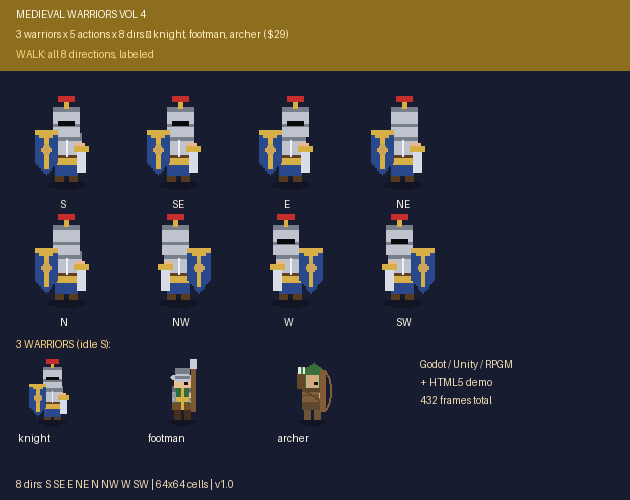
The real cover (630×500, vendored from the pack's preview/cover.png). Cover the S..SW labels, guess each row's facing from the sprites alone, then uncover — 7/8 or better and you can shop any 8-dir pack by sight.
The 3-step recipe
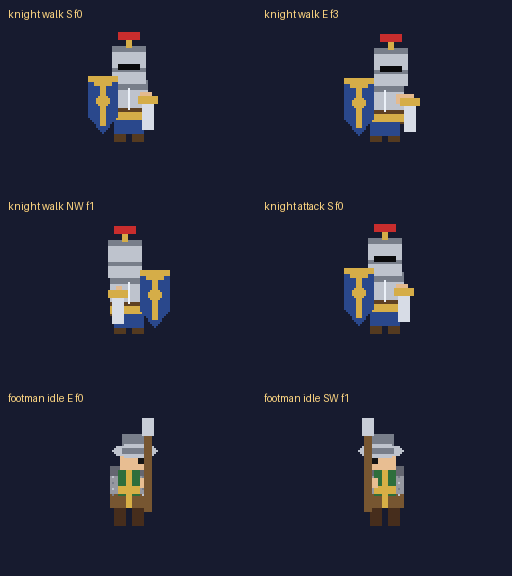
The 10-second grid check: rows tell you everything. Open the pack's cover or hero image. An honest 8-direction pack shows a labeled walk grid: 8 rows, one per facing, in S SE E NE N NW W SW order top to bottom. Then: (1) count the rows — 8 rows is true 8-direction, 4 rows plus "flip for the rest" is mirrored 4-direction; (2) check the facing order matches the exporter's assumption or diagonals play the wrong facing; (3) compare adjacent diagonals — SE vs E vs NE must actually differ (a heater shield, a kettle brim, a quiver never mirror cleanly); (4) look for the attack tell — a longsword cut / spear thrust / arrow-loose that reads at tiny sizes (ours runs at 10fps, hurt at 4fps); (5) demand per-action frame counts — walk 4 / run 6 / attack 4 / idle 2 / hurt 2 per direction is this pack's contract, and any seller that won't state counts is selling a surprise. Honest limit: extended weapon poses clip at the 64px canvas edge on some frames — check the hero close-ups before paying.
The playable-demo test: play the pack before you pay. Grids can lie; a playable demo can't. The full pack ships preview/index.html: arrows switch direction (all 8), keys 1–5 switch action (walk/run/attack/idle/hurt), C switches warrior — 120 anims (3 warriors × 5 actions × 8 dirs) behind eight keys. Test in two minutes: walk through all 8 facings (no marching-in-place means rows map correctly); press attack and confirm the cut fires on every facing; press hurt and confirm it reads; press C twice and confirm three visibly distinct warriors (great helm + heater shield vs kettle helm + spear + tabard vs hood + bow + quiver). No demo from a seller? Ask for the free sample slice instead.
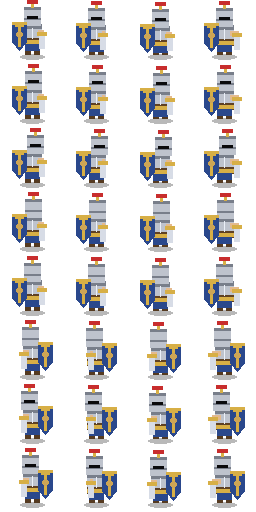
The slice-grid recipe: drop any honest pack into your engine. Every sheet here slices on a 64×64 grid — verify it first with our free Sprite Sheet Slicer & Packer (runs 100% in your browser, no upload). Name every clip <char>_<action>_<dir>, for example knight_walk_se. Godot 4: copy sheets to res://medieval/, attach assets/godot_medieval.gd to an AnimatedSprite2D, call load_sheets("res://medieval") then play_action("knight","walk","se") (Nearest filtering; honest note: Godot is not installed on our build PC, so the exporter is file-based code verified by selftest plus the HTML5 demo — the in-engine render is your 5-minute check). Unity: Texture Type Sprite (2D and UI), Filter Mode Point, Compression None, slice Multiple on the 64×64 grid per the table, see assets/unity_medieval.cs. RPG Maker MZ/MV: drop sheets in img/characters/, event note <MEDIEVAL: knight walk>, see assets/rpgmaker_medieval.js.
Slice grid for the medieval 64×64 8-direction sheets (exact pack sizes)
Sheet
Cols (frames)
Rows (dirs)
Cell
Sheet px
Start fps / loop
walk_8dir
4
8 (S,SE,E,NE,N,NW,W,SW)
64×64
256×512
8 / loop
run_8dir
6
8
64×64
384×512
8 / loop
attack_8dir
4
8
64×64
256×512
10 / once
idle_8dir
2
8
64×64
128×512
4 / loop
hurt_8dir
2
8
64×64
128×512
4 / loop
The real free-sample sheet (knight_walk_8dir.png, 256×512, vendored byte-identical from the pack's sample/sheets/). Drop it into the Sprite Sheet Slicer with 4 cols × 8 rows and each cell should hold one clean pose — that is the whole grid check, on real files.Real motion from the pack: knight walk loop (one of 120 anims, 54 frames / 54 distinct, 9.7s). The full demo drives all 3 warriors × 5 actions × 8 directions.
Free helper: medieval clip-name calculator + real sheet preview
Pick a warrior, action and facing. The helper shows the clip name, the sheet size, a copy-paste Godot 4 snippet — and previews the real knight_walk_8dir.png sheet from the free sample on a canvas. Everything runs locally — nothing leaves your device.
Related free tools
Sprite Sheet Slicer & Packer — verify any medieval sheet's grid before import (try the knight walk sheet above: 4 cols × 8 rows).