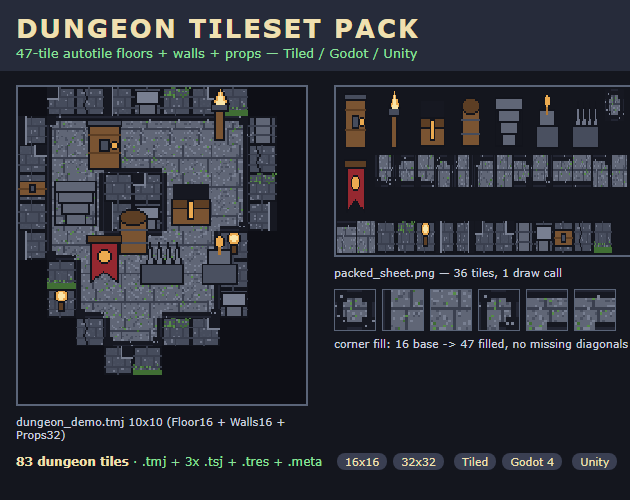
preview/cover.png). Top: the 10×10 demo room it paints. Middle: the packed sheet (255×84, 1 draw call). Bottom: the corner-fill strip — 16 bases become 47 filled floors, no missing diagonals.The 3-step recipe
- Sort tiles by pixel size — one layer per size. Keep 16×16 floors (16 bases) and 16×16 walls (12: tops, mossy, torch sconce, end caps, inner corners, pillars, lintel, cracked, foot trim) separate from 32×32 props (8: iron door, standing torch, chest, barrel, stairs down, altar, spike trap, banner). Do not scale one to match the other — scaling bleeds hard pixel edges. In the map file keep the map at 16px and give the props layer its own 32px size properties (
Floor16 + Walls16 + Props32in ourdungeon_demo.tmj). The editor opens and displays it; native per-layer re-render is still the editor's unsolved ask (Tiled#149), so treat this as a portable data convention. - Fill the 16-tile blob base to 47 corners. The 16 bases are the 4-bit edge combinations (tile id = neighbour mask: N=1 E=2 S=4 W=8). Paint a diagonal-only touch — two floor areas meeting at one corner pixel — and the base shows a void notch: there is no tile for it. The fix is 31 quadrant-composited variants (stamp top-left / top-right / bottom-left / bottom-right quadrants from different donor bases) so every outer diagonal (Godot#31003 gap) paints stone. Check: hash all 47 outputs and require 47 unique — a repeated hash means two corners share a donor pair. Our bench note records ~120 min by hand vs ~3 min generated (40×); time one hand run on your own set before believing any ratio.
- Pack to one sheet, then gate before you trust it. Shelf-pack everything on one RGBA sheet (ours 255×84) with a manifest (per-tile name + rect + frame order + per-layer sizes + autotile record). Verify every rect sits inside the sheet and none overlap — that is the no-bleed guarantee. Then re-parse every data file: region sizes match the manifest, zero bad image refs, Godot TileSet ASCII-only. Paint a 10×10 test room (floors + walls + props) and hunt diagonals: every outer corner shows stone, never background. That test is free and works on any seller's set.
| Symptom | Cause | Fix |
|---|---|---|
| Diagonal holes in floor blob | 16-tile base has no outer-diagonal tile | 31 quadrant composites (16→47); hash-check 47 unique |
| 32px door/chest drifts on 16px map | One tile size per map (Tiled#149) | One layer per size; Props32 layer carries its own 32px properties |
| Blurry tiles in Godot | Default smoothing | Filter: Nearest + Reimport, integer scale only |
| TMX opens with missing image | Image filename mismatch | Keep shipped folder layout so ../ refs resolve |
| Import "works nowhere" | Wrong engine path/version | Tiled 1.10 open .tmj; Godot 4 open .tres with res://assets/... paths; Unity PPU 16 + Point per guide |
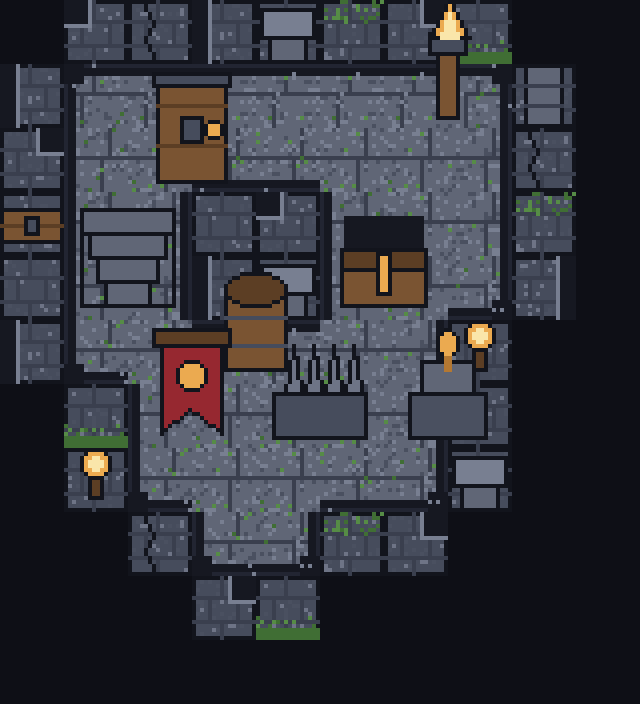
shot-map.png, vendored): the 10×10 demo map — Floor16 + Walls16 + Props32 — rendered from shipped tiles. If your room looks like this after step 3, your corners survived.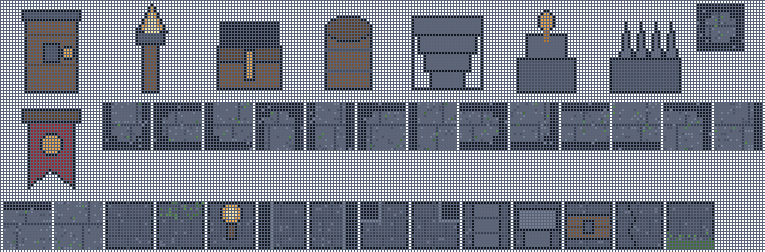
shot-sheet.png, vendored): 36 input tiles shelf-packed to 255×84 + manifest with 36 name+rect+order entries, verified no-overlap. One draw call.
shot-props.png, vendored): 8 chunky 32px props that read next to 16px floors. Thick outlines — thin lines vanish at this pairing.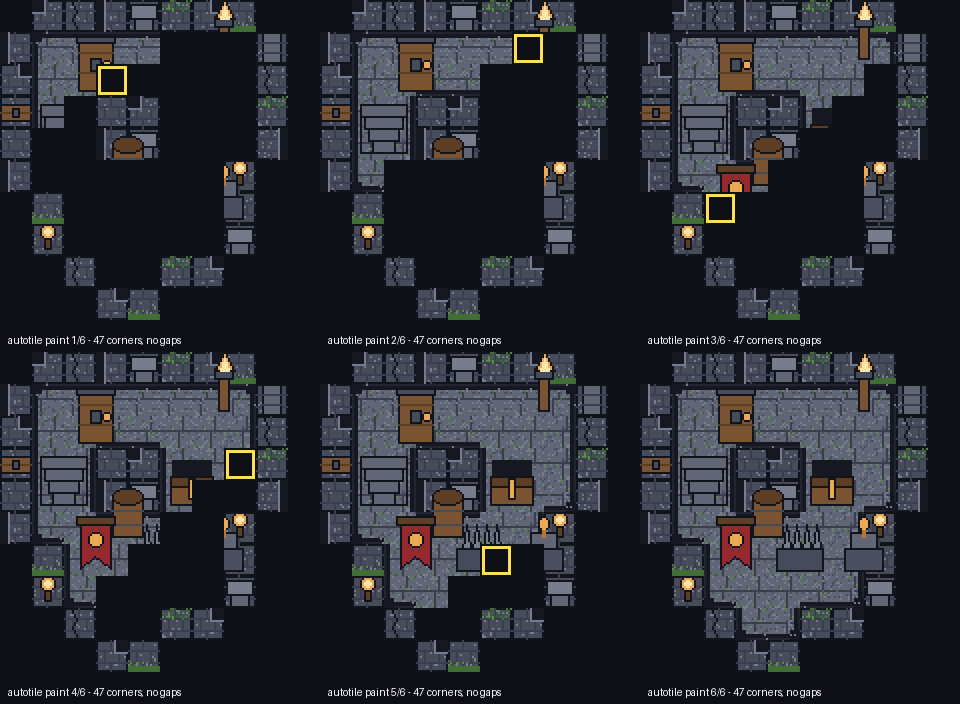
demo.gif, 6 frames, vendored): autotile paint sweep with corner highlight, rendered from shipped output — not a mockup.Free helper: blob-mask → tile picker
Click which orthogonal neighbours are floor (N/E/S/W). Then tick any diagonal-only touches (NE/SE/SW/NW). The helper shows the 4-bit mask, the Vol 0 base tile, whether the touch needs a Vol 1 composite — and a copy-paste Tiled snippet. Everything runs locally — nothing leaves your device.
Related free tools
- Tileset Splitter & Converter — verify any dungeon sheet's grid and export TMX/TSX/JSON/CSV (try the Vol 0 base: 16×16, no margin).
- Get a tileset PNG into Tiled + Godot 4 — the companion 8-minute recipe (exact grid → TSX/TMX → Nearest import).
- Import a sprite sheet into Godot 4 — the 5-minute sprite recipe (grid → Nearest filter → SpriteFrames).
- Palette Extractor — pull exact stone/moss/torchlight colors from a tile for matching props.
- Sprite Sheet Slicer & Packer — slice character sheets that walk these dungeon floors.
- All free game-dev tools